Having previously been a big user of Visual Studio I was rather dismissive of Visual Studio Code - it's just an editor for Macs, isn't it? Anyway, since seeing it in action in the technical sessions at the Microsoft Tech Summit in Singapore I knew it was now a lot more than a simple editor and was a credible rival to Visual Studio.
So, I downloaded it, started installing it, ticked all the boxes, and set about playing with it.
Some time later I noticed that when trying to open some folders in Windows Explorer that Visual Studio Code would open. This was odd - who on Earth would always want to open Visual Studio Code when double-clicking on a folder in Windows Explorer?
Investigating a bit further I saw that "Open with Code" was the top and default entry for the context menu for folders in Windows Explorer. So how to disable this?
I turned to Mr Google, and after a bit of browsing I came across this:
http://thisdavej.com/right-click-on-windows-folder-and-open-with-visual-studio-code/
The article describes itself thus:
Today’s topic is aimed at Windows users who are using Visual Studio Code and want to be able to right click on a given folder and launch VS Code. We’re going to add a right click context menu item to “Open Folder as VS Code Project” since it saves time—and it’s more fun!However, I want the reverse. I want to stop Visual Studio Code from always opening when I want to open a folder in Windows Explorer.
What appears to have happened was that in my eagerness to install Visual Studio Code and ticking all the boxes I'd ticked too many boxes. Namely, I'd ticked but not properly read these options:
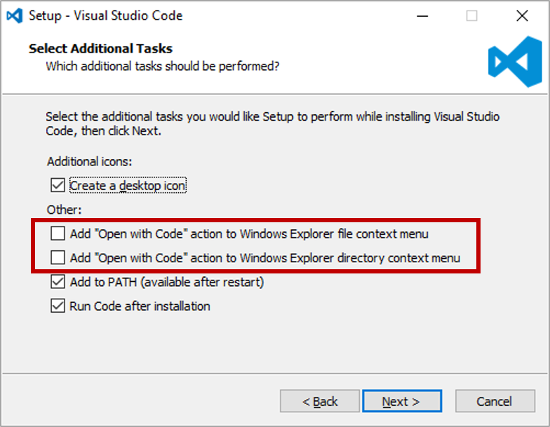 |
| http://thisdavej.com/wp-content/uploads/2016/03/VSCodeInstall.png |
Rather than uninstalling and re-installing Visual Studio Code I wanted something that was less time consuming. Anyway, the solution is to remove the correct entry from the registry, namely:
HKEY_CLASSES_ROOT\Directory\shell\vscodeWith that entry gone I can now open folders in Windows Explorer as intended, and I can still select "Open with Code" from the navigation pane. Huzzah!
